

AdvertisementReserved advertising space
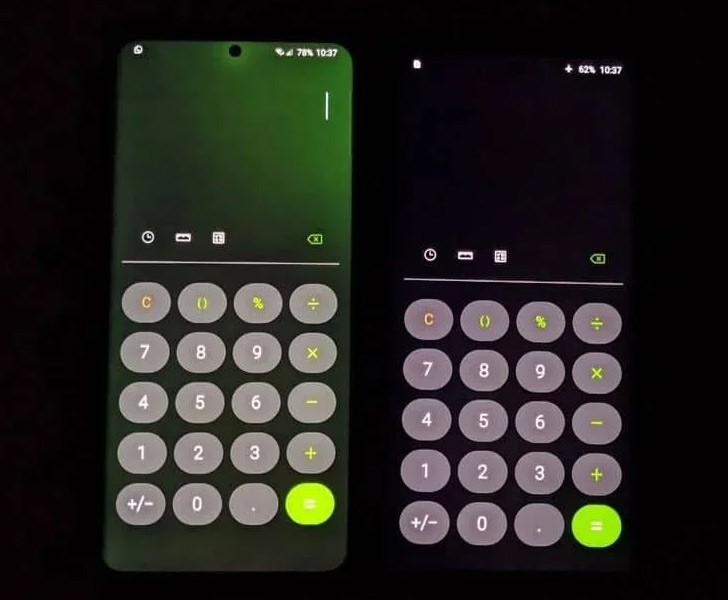
Samsung Galaxy S20 Ultra Runs into Another Software Bug that Tints the Display Green

The $1400 Samsung Galaxy S20 Ultra has been with plagued overheating, poor performance, and autofocus issues. More precisely, the global variant that runs on Samsung’s Exynos 990 chipset. Though Samsung patched the autofocus glitch, the update led to a new bug altogether.
Following several complaints which users lodged on Twitter, Samsung addressed the autofocus problem where the Samsung latest model’s camera fails to focus on a subject and instead gets stuck in a loop.
Samsung fixed the bug with a security patch, but the Korean manufacturer isn’t out of the woods yet as the update causes the S20 Ultra’s display to tint green. More to the point, some users report that the camera and overheating issues persist, even after the patch.

At a brightness level under 30% and a refresh rate setting of 120Hz, the screen turns a deep shade of bright green. Customers complain that the issue is more commonly seen in certain apps, including Samsung Pay, the default camera, calculator, Chrome, Telegram, and the popular game PUBG: Mobile.

The company has yet to formally address the bug on the new Samsung phones, which, in fact, appears to be a software-caused problem, rather than a hardware-related one. Because many users report that the problem can be corrected with a factory reset, Samsung will likely roll out a security patch for the bug with its next update.
Note that the green-tinting bug, along with the overheating and autofocus problems, appears to be exclusive to the Exynos 990 variant. Samsung’s Exynos platforms are famously known for their poor performance and buggy features, compared to their Snapdragon alternatives. A Snapdragon 865 chip powers the South Korean edition, and it seems to be working without hiccups.



Join the discussion
A place for your take on the story. Every comment is reviewed.
Add your voice.
Sign in to comment and reply.
Your Google name and photo appear with your comments.
Discussion guidelines
Keep it about the story. Links, spam, profanity, abusive language and sexual content are not allowed. All comments are reviewed before they appear publicly.
Loading discussion…
Comments
Newest firstLooking for an earlier discussion? Open the original article.